
|
i990501
NuovoDoc
InfoNote |
0.31 2013-08-22 12:43 -0700 |
|
|
i990501
NuovoDoc
InfoNote |
0.31 2013-08-22 12:43 -0700 |
- Latest version: The latest document-engineering version of this information is available on the Internet at
<http://NuovoDoc.com/info/1999/05/i990501b.htm>.- This version: 0.31 <http://NuovoDoc.com/info/1999/05/i990501d.htm>. Consult that page for the latest status and for the most-recent electronic copies of the material.
- Next version: 0.51 <http://NuovoDoc.com/info/1999/05/i990501e.htm> adjusts formatting and expands section 3 on the changing world of the desktop
- Previous version: 0.16 <http://NuovoDoc.com/info/1999/05/i990501c.htm>.
What keeps ODMA interesting, and what will keep it around?
I say that ODMA has done its job and will continue to steadily fulfill that need. Nevertheless, the world is moving to another way of integrating on the desktop and across the enterprise. ODMA will continue to provide a basic structure, although most activity is now on maintaining the work that has already been accomplished.
There are five points addressing the concerns of developers wondering about continued ODMA employment in document applications and in desktop interfaces of:
-- Dennis E. Hamilton
InfoNuovo
1999 May 10
revised 2000 May 7
In 1994,
ODMA 1.0 established an open, public approach for interoperability and smooth integration
between different document-management systems and document applications on the
desktop. The central idea: have document applications do as little work as possible
to integrate ODMA access along with existing file-system access for documents.
When an ODMA-aware document application begins to operate, it registers its presence with the ODMA Connection Manager in a single, simple operation. If the Connection Manager is not present, the document application simply operates with the file system as usual. If connection succeeds, the document application will offer DMS access as an option along with file-system access.
There is a simple trick: Every ODMA ID begins with the difficult-to-confuse prefix "::\ODM\". This is important: An ODMA-aware desktop application can be launched with an ODMA ID, or find an ODMA ID in a document link, and reliably select ODMA access instead of file-system access for operation with the identified document.
The application arranges to accept and retain ODMA IDs as easily as it carries file names. When requesting an existing file, applications use the ODMA API whenever an ODMA ID is encountered. When a new document is to be created, the document application offers the option of using ODMA to create a new, managed document, or using the file system to create a file-based document. When an existing document is to be opened, the user has the option of locating a document in the DMS or locating a document in the file system.
Document applications need only work on files in the file system. To access a document in a DMS, the DMS is given the ODMA ID of the document and identification of the format expected by the application. The DMS delivers the file(s) of the document in a file-system folder that the document application can use.
When the document application completes operating with a document, it informs the DMS via ODMA. The DMS takes the changes from the file-system location to which the document's file was delivered for opening by the application.
The document application doesn't have to implement any interactions with the operator about finding and storing documents in the DMS. The DMS provides all user dialogs that may be needed in order to carry out requests from the document application.
The document applications don't even have to know which DMS is involved in retention and delivery of different documents. The ODMA ID of the document also identifies the DMS, and the ODMA software ensures coordination with the specified DMS.
There is one ODMA Connection Manager module and any number of plug-in DMS drivers.
Under Windows, DMS desktop interfaces are installed as simple Microsoft COM objects. They are registered in a way that allows the ODMA Connection Manager to find them.
The ODMA Connection Manager uses a small number of COM-specific operations to activate a DMS for use with an application. The application uses a pure "C Language" interface to reach the ODMA Connection Manager. The application doesn't have to be a COM application or be developed with any awareness of COM.
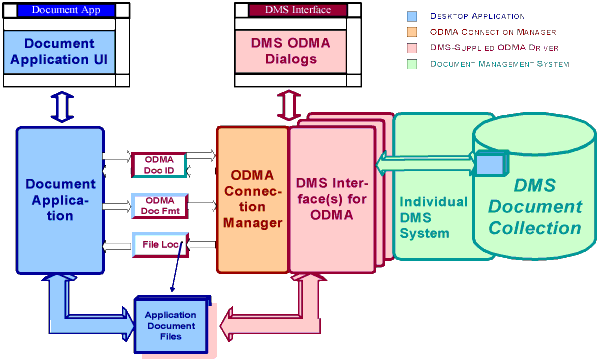
Figure. ODMA Integration between application and DMS (block diagram) [download Visio version]
The basic
ODMA 1.0 functions remain at the sweet spot of 1997's ODMA 2.0. It is easy to see
how to employ ODMA as widely as possible:
A: Support an ODMA 1.0-level API for optional operation.
Register the desktop application as an ODMA application and use the ODMA
interface to bridge to any document-management system the customer wants to use.
Whatever other integrations one wants to be known for, ODMA is too simple to pass up.
Use of additional ODMA 2.0 operations achieves smoother
operation for many Desktop applications. These can be used when
available. Applications should always be designed to treat
operations beyond the ODMA 1.0-level as optional and be able to work
around their absence.
A:
Provide an ODMA 2.0-level DMS Interface to the document-management system on the desktop.
Honor the ODMA document-identification and document-format agreements with the DMS
Interface. A DMS that does not support ODMA on the desktop is like an imaging system
that does not support TWAIN for integration of scanners and other image sources.
Generic desktop applications that only employ the
common, ODMA 1.0-level operations should still be able to operate smoothly
with your DMS.
The desktop has moved to component models and to the Internet for distributed integration technologies. ODMA is left behind or submerged in this approach.
The benchmark document application suite -- Microsoft Office -- features application integration using ActiveX, Visual Basic for Applications (VBA), and scripting languages. Java fits too. So does the Web. The application suite is itself componentized for use in customized construction and deployment of enterprise collaborative and document-centered applications. Think of it as the Collaborative Enterprise Desktop of choice.
The Microsoft realization
of this desktop capability is part of the Microsoft Distributed Netware
Architecture (DNA). The n-tiered application-distribution model
of Microsoft DNA is shared by all current enterprise application
architectures: Delivery of documents to and from the desktop is as component objects, containers, and object-oriented sequences of
results. ODMA support is an incidental
factor in this far-reaching object-oriented, distributed model. When
ODMA is accommodated at all, it is secondary, submerged functionality.
A: No, that's not
it. The straightforward, simple ODMA interface provides easy access to a
variety of DMS implementations at very low cost. ODMA support by a DMS provides
integration with document applications that have not, will not, or can not be moved to the
Microsoft Office suite model.
A: That just doesn't look like enough
for Windows applications any more. Don't ignore the synergies of desktop
componentization, enterprise customization, and distributed application available in the
Microsoft Office and Windows approach. Having your product interplay smoothly with
everything else that fits now and that will be there later is a very rich place to
position products and solutions. My unreliable sources tell me that there are tens
of thousands of developers using Microsoft Office for building custom solutions. I
don't know what fraction of them are operating at the VBA integration level, but don't you
want every one of them working on your side and integrating your product?
A: (sigh) However it looks now, what will change to make it easier later?
Another way to put it is that ODMA "ODMA doesn't have legs." I don't know how to say this better. ODMA does not seem to scale very far beyond its integration sweet spot. The point of diminishing returns arrives quickly. It seems to me that the ODMA API boundary is situated at an optimal point from which there is no exit that preserves ODMA simplicity.
In many ways, ODMA is very restricted. It was meant to be. The ODMA API was
not designed for client-server operation or working with "standard" COM objects.
ODMA is highly-attuned to what is required on a desktop system. It's greatest
success, and all of the integration model, is specific to Windows running on a single
computer.
A: Well, it is this kind of thing:
A: Perhaps. What difference does that make here?
A: Yes it can. And it is valuable to do so, providing distribution on the DMS side of the ODMA API and integration boundary. This is the common way that a DMS provides client-server operation: In the DMS driver on the desktop. This means that DMS drivers must be deployed to all desktops and configured for operation on each one. Sometimes, one can substitute a generic DMS driver that accesses provides client-server or Internet operation. This has been done using DMA repositories and WebDAV repositories. Generic DMS drivers are a big help, but they still must be deployed and configured for each desktop.
What's left for ODMA?
ODMA remains an ideal mechanism for delivering custom integrations of special-purpose DMS services through conventional desktop applications. So long as important desktop applications continue to be ODMA-aware, there is an opportunity for low-cost integration of custom, dedicated DMS applications. Even when the ultimate objective is integration in an n-tier distributed-object architecture, ODMA provides a low cost of initial entry and reduced learning curve for some important initial benefits. It is also appropriate where the distributed-object architecture of desktop applications is immature or impractical.
There are some simple steps
to extend the life of the ODMA API:
